
Download ttsMP3 – Free Text‑to‑Speech Converter, High‑Quality Voice Generator
Overview
ttsMP3 is a browser‑based, AI‑driven text‑to‑speech (TTS) conversion tool that focuses on delivering clear, natural‑sounding US English audio from any written content. Designed with e‑learning creators, presentation designers, podcasters, and web accessibility advocates in mind, the service lets users paste or type text, choose an accent or speaker, and instantly generate a downloadable MP3 file. Because the platform operates entirely online, there is no need to install heavyweight software on a PC or mobile device, which makes the tool both lightweight and secure.
The generated speech can be used for video narration, audio‑only podcasts, voice‑overs for slides, or to improve the accessibility of a website by providing an alternative listening option for visitors with visual impairments. In addition to the core US English voice, ttsMP3 supports several other languages and regional accents, giving creators the flexibility to match the tone of their brand or the demographic of their audience. The service also respects user privacy by processing text on secure servers and offering an easy‑to‑use interface that requires only a single click to download the finished MP3.
Whether you need a quick voice clip for a social media ad or a full‑length lecture recording, ttsMP3 provides a fast, reliable, and free solution that eliminates the need for expensive studio time or complex audio‑editing software.
Key Features
- High‑Quality US English Voice – Natural intonation, clear pronunciation, and a professional sound suitable for commercial projects.
- Multiple Accents & Speakers – Choose from various regional accents (e.g., American, British) and, in some languages, different speaker personas for added personalization.
- Instant MP3 Download – One‑click export of the generated speech as an MP3 file, ready for immediate use in videos, podcasts, or presentations.
- Web‑Based Interface – No installation required; works on any modern browser, making it accessible from Windows, macOS, Linux, Android, and iOS devices.
- AI‑Powered Pronunciation Engine – Advanced neural networks handle complex words, abbreviations, and punctuation, ensuring the audio sounds natural.
- Free Tier with Unlimited Text Length – Users can convert sizable paragraphs without hitting a character limit, perfect for lengthy scripts.
- Privacy‑First Processing – All text is encrypted in transit and processed on secure servers, with no data stored after conversion.
- SEO‑Friendly Audio Files – MP3s can be embedded on webpages to improve accessibility scores and boost search engine rankings.
Installation & Usage Instructions
Even though ttsMP3 is a web application, following a simple workflow ensures you get the best possible audio output without any hiccups. Below is a step‑by‑step guide that covers everything from accessing the site to embedding the final MP3 into your project.
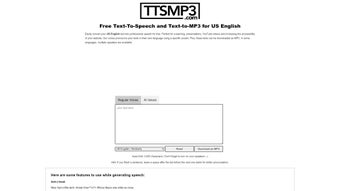
- Open the website: Navigate to ttsmp3.com using any up‑to‑date browser (Chrome, Firefox, Edge, Safari). The homepage loads a clean text box and a handful of voice options.
- Enter or paste your text: Click inside the large textarea and type or paste the content you want to convert. The platform supports Unicode characters, so you can include special symbols, emojis, or language‑specific characters.
- Select a voice: From the dropdown menu, pick the desired accent or speaker. For US English, options such as “Male – US English” or “Female – US English” are available. If you need a different language, expand the language selector and choose the appropriate voice.
- Adjust speech settings (optional): Some voices let you modify speed, pitch, or volume. These sliders are located under the voice selector. For most professional uses, the default settings are ideal, but you can fine‑tune them to match the tone of your brand.
- Preview the audio: Click the “Play” button to hear a short snippet of the generated speech. This preview helps you verify pronunciation and pacing before committing to a full download.
- Generate the MP3: Once satisfied, press the “Convert to MP3” button. The conversion typically takes a few seconds, depending on text length and server load.
- Download the file: After conversion, a “Download MP3” link appears. Click it to save the file to your local device. The file is named automatically based on the first few words of your text, but you can rename it later if needed.
- Integrate into your project: Import the MP3 into video editing software (Adobe Premiere, Final Cut Pro), audio workstations (Audacity, GarageBand), or embed it directly on a webpage using the HTML
tag.
Because ttsMP3 runs entirely in the browser, there are no hidden installation steps, drivers, or system permissions required. The only prerequisite is a stable internet connection and a compatible browser. For users who need to convert large batches of text, consider using the “Bulk Upload” feature (available in the premium plan) which accepts a .txt or .csv file and processes each line as a separate audio clip.
Compatibility, Pros & Cons, and Frequently Asked Questions
ttsMP3 is built on modern web technologies (HTML5, JavaScript, WebAssembly) and therefore works on any operating system that can run a contemporary browser. This includes Windows 10/11, macOS Monterey and later, Linux distributions with a recent Chromium‑based browser, as well as mobile platforms such as Android 9+ and iOS 13+. Because the service does not require a native client, you can switch between devices mid‑project without losing your workflow.
Pros
- Completely free for basic usage with no hidden fees.
- Instant MP3 generation—no waiting for lengthy render queues.
- Multiple accents and speaker options give a personalized touch.
- Secure, privacy‑focused processing; no permanent storage of user data.
- Lightweight, no software installation required.
- SEO‑friendly audio files that improve website accessibility scores.
Cons
- Limited to US English and a handful of other languages in the free tier.
- No advanced editing tools (e.g., background music, effects) built into the platform.
- Reliant on internet connectivity; offline usage is not possible.
- Premium features (bulk upload, higher‑quality voices) require a subscription.
- Voice customization is less granular compared to dedicated TTS SDKs.
Frequently Asked Questions
Is ttsMP3 really free to use?
Yes, the core text‑to‑speech conversion and MP3 download are completely free. There is a premium tier that adds bulk‑upload, higher‑quality voices, and commercial licensing, but it is optional.
Can I use the generated MP3s for commercial projects?
The free version allows commercial use under the standard license, but for large‑scale distribution or resale you may need a commercial license available in the premium plan.
What file format does ttsMP3 output?
The service outputs a standard MP3 file, which is universally supported by browsers, media players, and editing software.
Is there a limit to the length of text I can convert?
In the free tier there is no strict character limit, but extremely long texts may be split into multiple MP3 files for optimal processing speed.
How secure is my data during conversion?
All data is transmitted over HTTPS and processed on secure servers. The platform does not retain your text after the conversion is complete, ensuring privacy.
Conclusion & Call‑to‑Action
ttsMP3 stands out as a lightweight, free, and instantly accessible solution for anyone who needs high‑quality speech synthesis without the overhead of installing dedicated software. Its browser‑first approach, combined with a solid set of features—multiple accents, one‑click MP3 download, and a privacy‑first architecture—makes it an excellent choice for educators, marketers, developers, and content creators alike. While power users may eventually gravitate toward premium TTS platforms that offer deeper customization, ttsMP3 delivers more than enough capability for most everyday scenarios, from narrating a slide deck to creating audio‑enhanced web pages. If you’re looking for a secure, fast, and cost‑effective way to turn text into professional‑grade speech, give ttsMP3 a try today. Click the button below to launch the web app, generate your first MP3, and experience the convenience of AI‑driven voice generation.
Pros: Free, fast, high‑quality US English voice, multiple accents, secure, no installation.
Cons: Limited language selection in free tier, no offline mode, premium needed for bulk processing.



.png)



